Showing posts with label Ubuntu. Show all posts

Sunday, July 15, 2012

Ubuntu 12.04 - Let's Try Something A Little Different

Since the introduction of Unity as the default Ubuntu desktop, there have been both supporters and naysayers, who have debated the long-term viability of the technology.  I will admit that it took me a short period to become comfortable with Unity, but ultimately found that I liked it and was even more productive relative to my work in the Linux environment.  However, as of late, I have seen a number of technical news articles promoting Cinnamon.


Cinnamon is a desktop environment developed by the folks who have brought us Linux Mint.  For me, Cinnamon is a replacement for Unity and provides for a Gnome 2.x desktop experience.  Cinnamon is a fork of GNOME Shell, initially developed by Linux Mint. It attempts to provide a more traditional user environment based on the desktop metaphor, like GNOME 2. Cinnamon uses Muffin, a fork of the GNOME 3 window manager Mutter, as its window manager from Cinnamon 1.2 onwards.

Cinnamon is feature rich and provides many features, including the following:
  1. Desktop effects, including animations and transition effects
  2. A movable panel equipped with a main menu, launchers, a window list and the system tray
  3. Various extensions
  4. Applets that appear on the panel
  5. Overview with functions similar to that in GNOME Shell
  6. Settings editor for easy customization. It can customize: 
              The panel
              The calendar
              Themes
              Desktop effects
              Applets
              Extensions
    Cinnamon can be installed under Ubuntu 12.04 by using the associated PPA.  In a terminal issue the following commands:

    sudo add-apt-repository ppa:gwendal-lebihan-dev/cinnamon-stable
    sudo apt-get update
    sudo apt-get install cinnamon  

    Overall, I am very happy with Cinnamon under Ubuntu 12.04.  I suspect that I will retain this desktop for a while.

    Tuesday, May 03, 2011

    Ubuntu 11.04 Banshee Issue Overcome

    Upon installation of Ubuntu 11.04 (Natty Narwhal), I experienced difficulty with the default media player, Banshee. What I experienced was the Banshee UI not rendering text correctly. For me this made Banshee completely useless.

    Running Banshee from the command line prompt clued be into the fact that the file, /etc/pango/pango.modules, had not been created. Additionally, this provided insight as to how the file should be properly created. What I found when I attempted to issue the pango-querymodules command (noted below in Step 3) was that permission was denied, even when the command was prefaced with 'sudo'. Subsequently, this is what lead to the enabling of the 'root' account.

    The level of detail I provide below assumes a minimum familiarity with GNU/Linux systems and the associated vernacular. Without an further ado, in an effort to overcome the aforementioned issue I performed the following:

    1. Enable root account under Ubuntu by opening a terminal (CTRL-ALT-T) and using the commands:
    sudo passwd root
    sudo passwd -u root


    2. Bring up a text terminal (CTRL-ALT-F1) and login as 'root' using the newly established password.

    3. Once logged in as root, issue the command:
    pango-querymodules > '/etc/pango/pango.modules'

    4. Logout of 'root' account in text terminal (type 'exit', without quotes).

    5. Return to GUI (CTRL-ALT-F7), and fire up Banshee. If everything went according to plan, you should have a usable media player. That's all, folks.

    Saturday, April 17, 2010

    Screenshot for 04/17/10

    The following is a screenshot of my current desktop:

    Screenshot 04/17/10

    The following is a list of the pertinent components associated with this screenshot:

    Operating SystemLinux
    DistributionUbuntu 9.10 (Karmic Koala)
    Window ManagerOpenbox
    Window Manager ThemeCarbon
    Gtk ThemeDust
    Background ImageBay.jpg
    ScreenletsInfopanel
    OtherGnome Panel
    Tint2
    xcompmgr

    And with that, I am off to see the wizard...

    Saturday, February 21, 2009

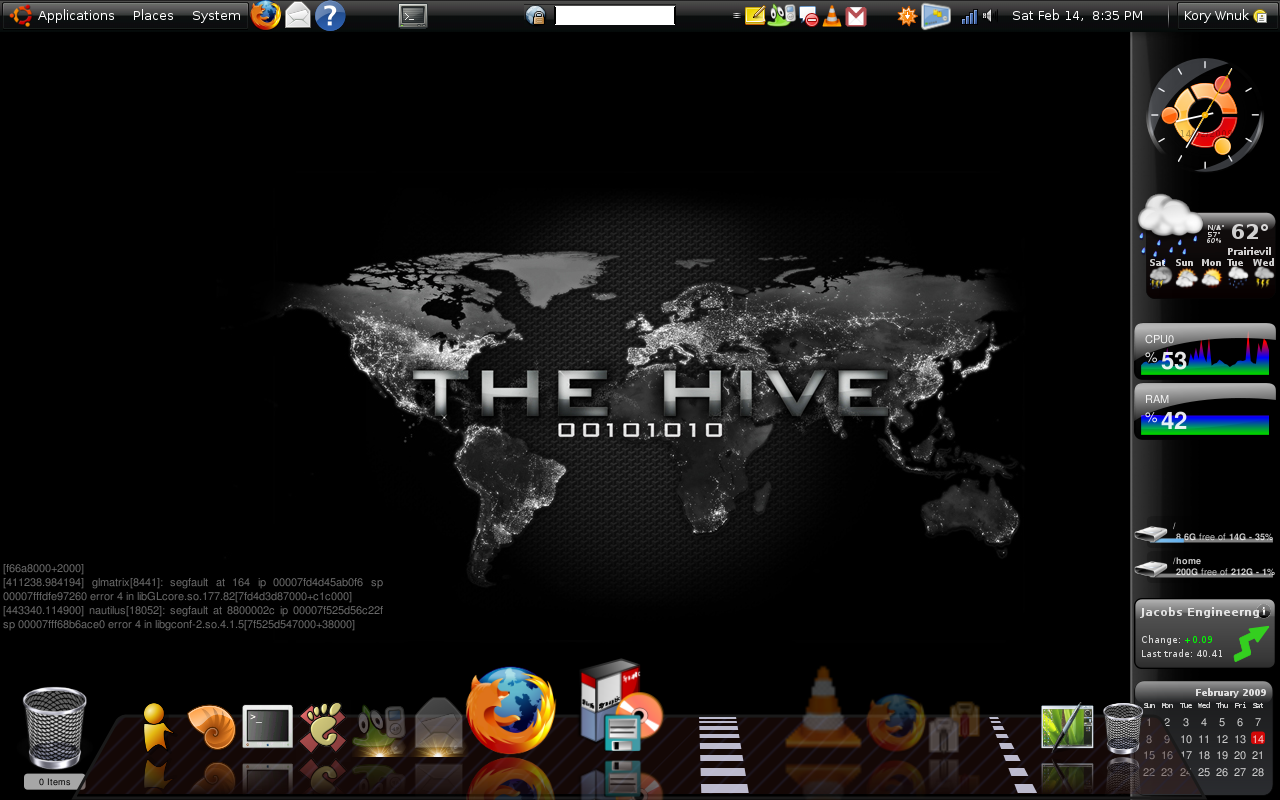
    Screenshot for 02/21/09

    I just wanted to take a second a share a screenshot of my current desktop configuration. Please note that clicking on the image below will afford you the opportunity to view the full-size screenshot, which is 1280x800. You may recognize this screen resolution as one that is common to laptops with a widescreen.

    Screenshot for 02/21/09

    The following is a list of the pertinent components associated with this screenshot:

    Operating SystemLinux
    DistributionUbuntu 8.10 (Intrepid Ibex)
    EnvironmentGNOME
    Gtk ThemeMoomex
    Background ImageThe Hive
    ScreenletsGNOME
    Clock
    ClearWeather
    Sensors
    Diskusage
    Stocks
    ClearCalendar
    Sidebar
    Output
    Trash
    OtherCairo Dock

    And with that, I am off to see the wizard...