Showing posts with label Linux. Show all posts

Sunday, July 15, 2012

Ubuntu 12.04 - Let's Try Something A Little Different

Since the introduction of Unity as the default Ubuntu desktop, there have been both supporters and naysayers, who have debated the long-term viability of the technology.  I will admit that it took me a short period to become comfortable with Unity, but ultimately found that I liked it and was even more productive relative to my work in the Linux environment.  However, as of late, I have seen a number of technical news articles promoting Cinnamon.


Cinnamon is a desktop environment developed by the folks who have brought us Linux Mint.  For me, Cinnamon is a replacement for Unity and provides for a Gnome 2.x desktop experience.  Cinnamon is a fork of GNOME Shell, initially developed by Linux Mint. It attempts to provide a more traditional user environment based on the desktop metaphor, like GNOME 2. Cinnamon uses Muffin, a fork of the GNOME 3 window manager Mutter, as its window manager from Cinnamon 1.2 onwards.

Cinnamon is feature rich and provides many features, including the following:
  1. Desktop effects, including animations and transition effects
  2. A movable panel equipped with a main menu, launchers, a window list and the system tray
  3. Various extensions
  4. Applets that appear on the panel
  5. Overview with functions similar to that in GNOME Shell
  6. Settings editor for easy customization. It can customize: 
              The panel
              The calendar
              Themes
              Desktop effects
              Applets
              Extensions
    Cinnamon can be installed under Ubuntu 12.04 by using the associated PPA.  In a terminal issue the following commands:

    sudo add-apt-repository ppa:gwendal-lebihan-dev/cinnamon-stable
    sudo apt-get update
    sudo apt-get install cinnamon  

    Overall, I am very happy with Cinnamon under Ubuntu 12.04.  I suspect that I will retain this desktop for a while.

    Sunday, May 02, 2010

    Messing Around with Enlightenment


    Sometime in the '99 time frame I had used the Enlightenment window manager off and on. After having read an article in the latest issue of Linux Journal, I became curious as to what was new with Enlightenment. Specifically I was interested in E17, as E16 is available from the Ubuntu repositories. Subsequently, I grabbed a snapshot of the associated code via SVN, compiled the source code, and got Enlightenment (E17) up and running. The picture shown above is a screen shot depicting the fruits of my labor relative to my Enlightenment mini project.

    Presently I am acclimating myself to the idiosyncrasies of Enlightenment, but like what I see thus far. I am of the opinion that Enlightenment is still one of the most elegant windows managers available for Linux. My understanding is that development continues, albeit at a very slow pace. It should be noted that E17, as it currently exists, is still in a state of flux and may not be stable enough for daily use. Personally I have not had any major problems to report.

    And with that, I am off to see the wizard...

    Saturday, April 17, 2010

    Screenshot for 04/17/10

    The following is a screenshot of my current desktop:

    Screenshot 04/17/10

    The following is a list of the pertinent components associated with this screenshot:

    Operating SystemLinux
    DistributionUbuntu 9.10 (Karmic Koala)
    Window ManagerOpenbox
    Window Manager ThemeCarbon
    Gtk ThemeDust
    Background ImageBay.jpg
    ScreenletsInfopanel
    OtherGnome Panel
    Tint2
    xcompmgr

    And with that, I am off to see the wizard...

    Monday, March 16, 2009

    Radical Comic Designer 1.0.1 Review

    Last week Radical Comic Book Designer 1.0.1 was released by Radical Breeze (Bryan Lunduke of Jupiter Broadcasting fame). This software is available as Linux and Windows binaries. However, this review will concentrate on the Linux binary solely, which is available as a 2.1 MB .deb, or .gz, download from Radical Breeze.

    As the name implies, Radical Comic Designer is used to create comics and comic books quickly and easily. This is accomplished by dragging and dropping various comic elements; such as panels, speech bubbles, and custom captions; onto the comic page. These elements are arranged by dragging and dropping, resizing, and moving up and down relative to other elements.

    With the comic layout complete, the logical next step is to add the artwork. Not being an artist, nor having any real preconceived comic notion, I simply used some JPG images I had on my hard drive. I should note that even if I were an artist, Radical Comic Designer is not designed to have the ability to create the artwork, as is explicitly stated on Bryan's blog.

    Once dropped into a comic panel, pictures are edited by double clicking on them. Editing entails resizing or adding an effect. The picture editing effects available are: pixelated, oil painting, and sepia tone. Any other editing requires an external program, such as GIMP.

    Once the comic is at a saving point, the comic project is saved in the Radical Comic Designer (RCD) format, while the working page can be individually exported to a JPG file. Additionally, the entire comic can be exported to either a series of JPG files or a single CBZ file, the latter of which can be read by the RadicalCodex comic book reader.

    Conclusion
    After spending a few hours working with this software, I found Radical Comic Designer to be a very cool concept. Also, I found the interface to be concise and intuitive. That is, becoming functional with this software requires neither a 2-inch thick manual, nor a PhD in nuclear physics. Overall, while not perfect at this stage of development, I expect Radical Comic Designer to quickly become a staple of any serious comic developer's arsenal of tools.

    Update
    During the preparation of this review, Radical Comic Designer 1.1 was released with the following improvements:
    1. Use of the keyboard cursor keys to assist in the arrangement the comic elements. This is helpful for fine-tuning the comic layout.

    2. Set a default font (including color, size, etc.) for all new text.

    3. A number of new picture effects (e.g., water droplets, ripples, etc.) have been added.

    4. When quitting, if there are unsaved changes, the user is prompted as to whether or not the file should be saved.

    5. Improvement to the rendering of speech bubbles and text.

    6. A few other minor user interface tweaks and fixes.

    And with that, I am off to see the wizard...

    Monday, March 09, 2009

    Regnum Online Review

    Earlier this morning I was participating in a live recording of a Linux Outlaws podcast and during a review of listeners' email I noted a Linux game called Regnum Online. Regnum Online is touted as being "The best Realm vs. Realm action available FOR FREE". It is an MMORPG game developed by NGD Studios S.A. and utilizes OpenGL. There is a Windows client that utilizes DirectX, but for this review I will concentrate on the Linux client.

    Before I go any further I need to qualify the fact that I am not a hardcore gamer. However, I have recently found that I enjoy Frozen Bubble because of the simplicity of game play. Additionally, I have developed a love for the game, World of Goo. Still I am not a gamer, but I digress.

    After the recording of the podcast, I visited the Regnum Online website and promptly downloaded a 428.4 MB binary installation file for 64-bit Linux. On the Regnum download page there was note made to the fact that there is no official support for the Linux client due to its experimental nature. Additionally, the 64-bit version of the Linux client requires the presence of 32-bit libraries to execute the installer properly. The specific 32-bit libraries required were not explicitly noted on the download page, but I must have had them in place because the installation went without a hitch.

    Once the Regnum Online software was installed on my System76 Pangolin Performance laptop, I created an account on the website. There was an option on the Linux client startup dialog box to create a new account, but it failed to take me to the appropriate web page because it could not access the default web browser. This was a little disappointing, but certainly something I could work around.

    As far as game settings are concerned, I basically left the default settings, utilizing full-screen. However, as I previously mentioned, the Linux client was installed on my laptop which has a 15.4" wide-screen. Subsequently, I was pleasantly surprised to find that there was an option to set the screen resolution at 1280x800.

    With the Regnum Online Linux client up and running and a connection made to a Regnum Online server, I began things by selecting the world of which I would become a part. Personally, I selected Horus (International) because I am a native English speaker. However, there are Spanish/English and German worlds from which to choose.

    After creating a character, which was simple to complete without explicit instructions. In other words, the process for creating a new character was concise and very intuitive. With this process complete, I found myself transported to a time and place as far away from reality as I could imagine.

    Once in the game, it took me approximately 60 seconds to understand what I need to do to communicate with the in-game characters. This is accomplished by selecting the character, with the left mouse button, to whom you wish to communicate, and then left mouse clicking on the character again.

    After having communicated with three in-game characters, I was sent on my first training mission which entailed killing five (5) black beetles. This was completed with relative ease and led to my next mission which involved killing five (5) tiny tarantulas. This is where I stopped my mission, leaving it for another day. Almost one hour of game play was all that was available before I was being called for supper.

    Experimental clicking on the character interface afforded me the opportunity to learn a little more about what I can expect from future game play. The following is a list of game selling points as was presented on the official game site:

    - Regnum offers 3 realms to choose from.
    - 9 fully customizable player characters.
    - An ever expanding number of quests.
    - The ability to capture forts and castles.
    - Expansive lands to explore.
    - Glorious graphical environments in DirectX and OpenGL.
    - Support for Windows and Linux platforms.
    - Premium content available for enhanced game play.

    I do plan on exploring this game further, but from what I have experienced to this point, I am pleased. It is at this point that I have to give Regnum Online two thumbs up. The game is well done and professionally crafted both in terms of graphics and game play. If you have not had the opportunity to play Regnum Online, or did not even know about it, I recommend that you give it a spin and spend some time in another world of the imagination.


    And with that, I am off to see the wizard...

    Friday, February 27, 2009

    The Spread of Fear, Uncertainty, and Doubt Benefits No One in the Long Run

    Picture of TomTomDuring this past week the so-called big news revolves around Microsoft's lawsuit against TomTom. A number of prolific Linux pundits are inexplicably able to extrapolate the available information and make giant intellectual leaps, thereby suggesting that this particular law suit is simply the tip of the iceberg relative to an all out legal attack on Linux and/or Open Source Software (OSS). Personally I find that such an extrapolation is at best laughable, and at worst, detrimental to the Open Source struggle.

    Generally speaking, the direction of FUD spread is toward the Open Software movement. However, this is a case in which FUD has been flung in the opposite direction, specifically at Microsoft. When individuals in positions of celebrity spread FUD, they more often than not portray in a negative light, not the intended object of the FUD, but rather, themselves and the organizations they represent. This is true no matter the direction of FUD spread.

    In the case of Open Software, I am of the opinion that "jumping to conclusions" and spreading FUD portrays the community as a group with something to hide. Have we not conducted our business in an honest, above-the-boards manner? Are we a bunch whiny conspiracy theorists who are afraid of our own shadows? I contend that the answer to both questions is a resounding "No"!

    While I am not going to try to detail here my opinion as to whether or not the Microsoft lawsuit is frivolous, I am of the opinion that our community needs to take a step back and try to view ourselves from the eyes of those who do not have the same level of awareness and understanding of our cause. Jim Zemlin and Bryan Lunduke are just two individuals with whom I agree that Microsoft's lawsuit is not against Linux and/or Open Source Software. Instead, the lawsuit, until proven otherwise, is against TomTom.

    The following is a The H Open Source news post regarding The Linux Foundation's Opinion on Microsoft Versus TomTom:
    Linux Foundation Executive Director Jim Zemlin said in his blog yesterday (26th February) that the Microsoft patent infringement suite against TomTom, at least at present, does not appear to be a covert attack on Linux. Microsoft have made assurances that their dispute is solely with TomTom and Zemlin says there is no reason to doubt that is the case, or to suspect a move against the Linux ecosystem.

    Microsoft say that TomTom infringe on eight Microsoft held patents. Three of those patents concern methods of organising data filing systems and relate to the FAT system. It's this which may cause some concern among the Linux community because Linux does provide support for the FAT filing system. TomTom use an embedded version of Linux inside their portable SatNav devices.

    Zemlin says that if the case does result in a threat to Linux then the Foundation is well prepared to defend Linux and that the "Linux ecosystem has enormously sophisticated resources available" for its defence.

    The Linux community is perhaps understandably nervous when a possible threat appears, due to the long standing SCO Group lawsuits. Originally, in 2003, the SCO Group filed suit against IBM, claiming that Linux incorporated large segments of code that was proprietary to SCO UNIX. At one point in the legal battle Microsoft appeared to fund the SCO Group by buying licensing for SCO UNIX and by arranging funding from other sources, it was assumed in the hope of seriously damaging Linux. Fortunately for the future of Linux, things did not go at all well for the SCO Group and it has recently filed for Chapter 11 bankruptcy protection mainly due to the costs of its anti-Linux legal battles.

    As Linux grows in influence and market share it is increasingly likely that it will come under patent related attack. However there is growing concern that many patent suits within the computer industry in general, are either strategic or made by patent trolls, purely for commercial gain and are not genuine patent challenges. It seems there will be legislation and patent law reform to curb such attacks.

    (trk)

    And with that, I am off to see the wizard...

    Saturday, February 21, 2009

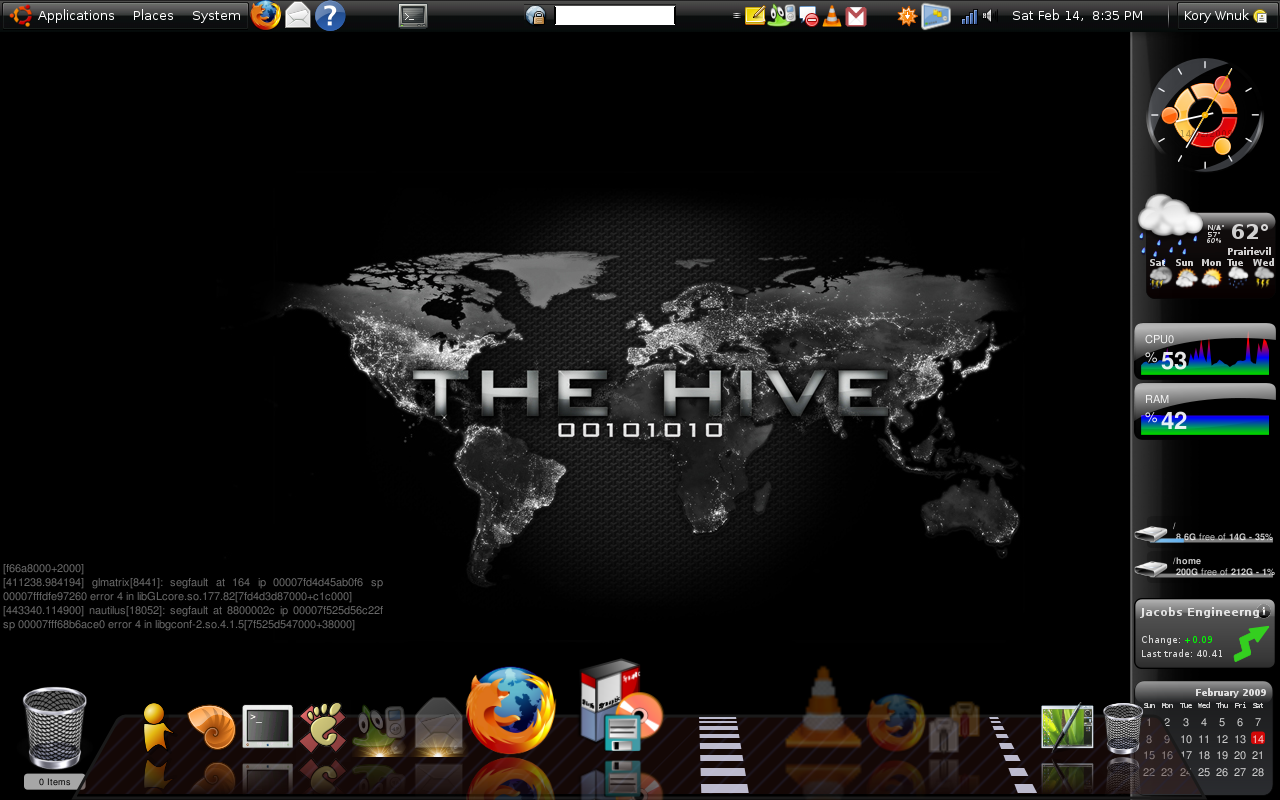
    Screenshot for 02/21/09

    I just wanted to take a second a share a screenshot of my current desktop configuration. Please note that clicking on the image below will afford you the opportunity to view the full-size screenshot, which is 1280x800. You may recognize this screen resolution as one that is common to laptops with a widescreen.

    Screenshot for 02/21/09

    The following is a list of the pertinent components associated with this screenshot:

    Operating SystemLinux
    DistributionUbuntu 8.10 (Intrepid Ibex)
    EnvironmentGNOME
    Gtk ThemeMoomex
    Background ImageThe Hive
    ScreenletsGNOME
    Clock
    ClearWeather
    Sensors
    Diskusage
    Stocks
    ClearCalendar
    Sidebar
    Output
    Trash
    OtherCairo Dock

    And with that, I am off to see the wizard...

    Saturday, February 14, 2009

    Ten Reasons Why Linux Will Triumph Over Windows

    Originally Posted by Jack Wallen in February 14, 2009

    Windows 7 may be generating some positive buzz, but Jack Wallen remains skeptical. In fact, he says it’s only a matter of time before Linux takes its rightful spot at the top of the OS heap.
    I have an announcement. The error of Microsoft’s ways is finally catching up and will cause the once-invincible juggernaut to kneel before that which is Linux. How is this? Microsoft started a tiny snowball when it released Windows Me. That snowball did nothing but gain momentum. There have been ups and downs along the way (XP being an up, for sure). But for the most part, the court of public opinion has steady lost faith in what once was considered the heart of personal computing.

    If you don’t believe me, read on.

    Note: This article is also available as a PDF download.

    1: Inconsistent Windows releases

    One of the things you can always count on from Microsoft is that you can’t count on its new operating systems to be reliable. Let’s take a look at the individual releases:
    * Windows 95: Revolutionized personal computing.

    * Windows 98: Attempted to improve on Windows 95; failed miserably.

    * Windows Me: A joke, plain and simple.

    * Windows NT: Attempted to bring enterprise-level seriousness to the operating system; would have succeeded had it not taken Steven Hawking-like intelligence to get it working.

    * Windows XP: Brought life back to the failing Windows operating system. It hadn’t been since Windows 95 that the operating system was this simple.

    * Windows Vista: See Windows Me.
    With this in mind, what do we expect from Windows 7? Myself, not much.

    2: Consistent Linux releases

    Converse to number 1, you have the far more consistent releases of the various Linux distributions. Yes, there have been a few dips along the way (Fedora 9 being one of them). But for the most part, the climb for Linux has been steadily upward. Nearly every Linux distribution has improved with age. And this improvement isn’t limited to the kernel. Look at how desktops, end-user software, servers, security, admin tools, etc., have all improved over time. Once could easily argue that KDE 4 is an example of a sharp decrease in improvement. However, if you look at how quickly KDE 4 has improved from 4.0 to 4.3 you can see nothing but gains. This holds true with applications and systems across the board with Linux.

    3. Continuing Windows price hikes

    Recently, I have had a number of long-time Microsoft administrators asking my advice on solid replacements for Exchange. The reason? Microsoft changed its licensing for Exchange to a per-user seat. Now anyone who logs on to an Exchange server must have a license. You have 100 employees (including administrators) who need to log on to Exchange? Pony up! This gets serious when your company starts having to cough up the money for 500+ Exchange licenses. The very idea that Microsoft would make such a bold change to licenses is made even more ridiculous considering the current state of the economy. Companies worldwide are having to scale back. And like Exxon Mobile celebrating record profits amid the catastrophe known as Hurricane Katrina, Microsoft creating such a cost barrier while the globe is facing serious recession is irresponsible and reprehensible.

    4. Stable Linux “prices”

    Converse to number 3, the prices of open source software licenses have remained the same — $0.00. When those administrators come to me asking for open source replacements for Exchange I point them to eGroupware and Open-X-Change. Both are outstanding groupware tools that offer an even larger feature set than their Microsoft equivalent. Both are reliable, scalable, secure, and free. The only cost you will have with either is the hardware they are installed upon. And with both packages, there is no limit to the amount of users that can be set up. One user, 1,000 users — it’s all good with open source software.

    5: Windows hardware incompatibility

    Microsoft Vista was a nightmare when it came to hardware compatibility. Not only was Vista incompatible with numerous peripherals, it took supercomputer-level iron to run the operating system! Sure this was a boon to Intel, which stood to make a pretty shiny penny. Intel knew a good amount of the public would be shelling out for new hardware, and the new hardware would cost more because it had to be faster to run Vista in all its Aero glory. But even hardware that would run nearly any other OS with lightening-fast speed was brought to a slow, grinding halt with Vista.

    6: Linux hardware compatibility

    Converse to number 5, Linux continues to advance in the category of hardware compatibility. Take Xorg, for example. Recent developments with the star of Linux’ graphical desktops have the X Windows server running sans xorg.conf. This was done primarily because the system had grown so good at detecting hardware. And so long as there wasn’t a cheap KVM between your monitor and your PC, Xorg would easily find the mode for your display and run X properly. With new distributions (such as Fedora 10), X configuration is becoming a thing of the past. Most other pieces of hardware are finding the same level of recognition.

    7: Windows promises

    I wanted to save this for last, but seeing as how it is number 7… We’ve all heard the pundits proclaiming Windows 7 will be the resurrection of the Microsoft operating system. But I recall this same proclamation with nearly every release from Redmond. Windows Vista was going to revolutionize the way the user interfaced with the computer. Vista was going to be the operating system you would never notice. Instead, Vista refused to NOT let you notice. And Windows Me was going to take Windows 98 and make it far more simple for the average user. What did it really do? Remove nearly every actual functioning system in the operating system, leaving little more than a browser and an e-mail client.

    Everyone is always fond of saying the next Windows release will redefine the personal computer. But the public has finally reached such a point of apathy for Microsoft’s up and coming, the majority doesn’t even realize something new is coming out. The media can continue to push Windows 7, but the public will continue using XP until Microsoft pries it from its cold, dead fingers. And of course no one really knows when Windows 7 will land. How many dates Microsoft announces vs. how many dates change will probably be a 1:1 ratio.

    8: Linux transparency

    Converse to 7… The next release of any Linux distribution is never shrouded in mystery. Because of the nature of open source, the release candidates are always available to the public (and not on a limited basis), and the timeline is always made available. Any user can know exactly when a feature-freeze happens for a release of any distribution. And all Linux distributions work under the “full disclosure” model. Because of this, there is little false advertising going on with Linux. And unlike with Microsoft, you will never hear of a distribution claiming that its next release will revolutionize computing. If you go to the Fedora Project Wiki, you can view all the proposed and accepted features that will be included in the next release. You can also view the completed release schedule, where you will see that Fedora 11 has set an alpha release of 02/03/09, a beta release of 03/24/09, and a final release of 05/26/09. These dates are fairly firm and almost always on target.

    9: Feature comparison

    Let’s compare the feature lists of Windows 7 and Fedora 11.
    * Windows 7: OS X-like Doc, Multi-touch screen, mapping application similar to Google Earth, Hyper-Visor virtualization, location-aware apps, User Access Control improvements, Sidebar removal.

    * Fedora 11: 20-second boot time, btrfs file system, Better C++ support, Cups PolicyKit integration, DNS Security (DNS SECurity), ext4 default file system, Fingerprint reader integration, IBUS input method replaces SCIM (to overcome limitations), GNOME 2.26, KDE 4.2, Windows cross-compiler inclusion.
    If you look at those features in and of themselves, you could easily argue that either one could be the more impressive list (depends upon your bias). But understand that the Fedora 11 features are added on an already outstanding operating system, whereas the Windows 7 features are being added to a lesser operating system. And what Microsoft is proclaiming to be the biggest improvement (multi-touch) doesn’t actually improve the operating system and also requires, surprise, new hardware! To get the most out of Fedora 11, you’ll be good to go with what you already have.

    10: Hardware requirements

    Vista-lite? Out of the mouths of Microsoft comes the proclamation that Windows 7 will run on any hardware that would run Vista and even slightly less powerful hardware. Slightly less powerful? What exactly does that mean? Well for one, Windows 7 will have no luck in the netbook market. And since XP is dying, the netbook market will be owned by Linux. Netbooks are not gaining enough power to run anything from Windows but the watered-down version of XP. Netbooks are not going anywhere, and consumers (both home and corporate) have their limits on how many hardware upgrades they will make to fulfill an operating systems’ needs. As of Fedora 10, the minimum system requirements look like something out of the mid ’90s.

    Jack Wallen PictureJack Wallen was a key player in the introduction of Linux to the original TechRepublic. Beginning with Red Hat 4.2 and a mighty soap box, Jack had found his escape from Windows. It was around Red Hat 6.0 that Jack landed in the hallowed halls of TechRepublic. Read his full bio and profile.
    As much as I am in favor of OSS, FOSS, or FLOSS operating systems and/or software, and for as much an optimist as I am, I do not believe that Linux world domination will be as simple as the above opinion might lead one to believe. After all, there is the whole issue of the Microsoft Trained Brain Syndrome with which we have to contend.

    And with that, I am off to see the wizard...

    Update II: BloGTK v1.1

    Now that I have had a chance to use BloGTK v1.1 quite a bit more, I have formed some definite opinions. This software has the potential to be very good. However, it is felt that this is definitely an unfinished work.

    With this said, the following is a list of items that I am either not sure what to do with, or those items that do not appear to be active:

    From Figure 1 - "Edit Post" Tab:-

    I have tried everything I can think of, but the "Title" field does not appear to be active. For me, the work-around is simply to edit this once the file has been uploaded to the website where the post will be made.

    There is a drop down list box with a green arrow to its right. I think this is for applying a "custom tag". However, I have not yet determined how to add a custom tag. Within the menu, under "Edit", there is an entry for editing custom tags. My problem with this is that if I add a custom tag, the next time I run BloGTK, the application will not start because of errors that originate in the custom tag configuration file.

    This is another drop down list box labeled "Category" that is not self-explanatory. There is nothing listed here. Subsequently, I am not entirely sure what the function of this drop down list box is.

    Figure 1
    Figure 1

    From Figure 2 - "Advanced Tab:-

    The "Extended Entry", "Excerpt", "Keywords", and "TrackBack URLs" do not appear active. I guess I am curious to know whether they can be made active, or if they are simply unfinished programming items. I suspect that the latter is the case.

    The checkbox items; "Convert Breaks", "Allow Comments", and "Allow Pings" are also disabled.

    Figure 2
    Figure 2

    Perhaps, if during the setup of the Weblog server were designated as something other than the Blogger type, some of the aforementioned items would be functional. This is something that has not been verified.

    And with that, I am off to see the wizard...

    Friday, February 13, 2009

    Assign Application for Specific Mime Type

    For my multimedia, whether it is audio and/or video, I prefer to use VLC. However, when browsing files using Nautilus under GNOME, I found that the default application associated with a specific multimedia type was not the VLC I desired. This is not a major issue as I can right mouse click on the iconic representation of the file I want to initiate, and then select VLC from the menu (see Figure 1):

    Figure 1
    Figure 1

    In this case I have already made the necessary modification such that when I double-click on the multimedia file in question, VLC is automatically initiated. Suppose however that this was not the case. The next step would be to select the "Properties" menu item. Again, refer to Figure 1.

    The result is a dialog box similar to that which is depicted in Figure 2.

    Figure 2
    Figure 2

    Toward the top of the dialog box, select the "Open With" tab. The result will be similar to that depicted in Figure 3. From here, select the appropriate application you wish to use as the default for opening a file of this type.

    Figure 3
    Figure 3

    It should be noted that if the application you wish to use is not listed, you can select the "Add" button near the bottom of the dialog box and provide the required information. Once you are happy with your application selection, click on the "Close button at the bottom right-hand side of the dialog box and you are finished.

    Now when you double click on the icon associated with a file of the specific type for which you just defined the default application, the newly selected application will be launched.

    And with that, I am off to see the wizard...

    Thursday, February 12, 2009

    Linux 101 Hacks - Download Free eBook

    I have not yet fully reviewed this Free eBook, but it looked to be interesting relative to the contained information as was detailed in the table of contents. Once I make my way through this, I will be sure to convey my overall impression.

    I’m happy to announce the release of my first Free eBook — Linux 101 Hacks. There are total of 101 hacks in this book that will help you build a strong foundation in Linux. All the hacks in this book are explained with appropriate Linux command examples that are easy to follow.

    This free eBook contains 12 chapters with total of 140 pages. Hacks mentioned in 6 chapters are based on the articles that I’ve already posted on my blog. Hacks mentioned in rest of the 6 chapters are brand new.

    Get your copy here.
    Linux 101 Hacks

    If anyone stumbling across this has the opportunity to take a look at this eBook before I do, please let me know your thoughts. Thanks.

    And with that, I am off to see the wizard...

    Tuesday, February 10, 2009

    Linux Versus the Microsoft Trained Brain Syndrome

    The following article is an extention to the previous post, Free software isn't freeware: why Linux and FOSS have a higher standard, where I hypothesize the reasons the general public is hesitant to make the switch to free/open source software. Perhaps I did not experience Microsoft Trained Brain Syndrome because I have always have had an open mind relative to computer software alternatives. As an example, when most folks were dealing with Windows 3.1, Windows for Workgroups 3.11, Windows 95, Windows 98, Windows NT, or Windows 2000, I was either running PC DOS and then IBM's OS/2, the later of which was far suprior to at least Windows 95. It is too bad that OS/2 did not go further than it actually did. In any event, on to the aforementioned article.
    Feb 10th, 2009 by Gene.

    Recent articles I have read by people complaining about how things on Linux do not work like they do on Microsoft led me to coin the phrase Microsoft Trained Brain Syndrome (MTBS). The problem is that people who have lived, worked, and played in a homogeneous Microsoft computing paradigm are lost and confused when they encounter a different paradigm. These people have only seen the flawed Microsoft ideology for how computing systems should work and so have a difficult time with more elegant systems based on Unix. They see the Linux system with its’ own paradigm and ideology and try to force it into the only paradigm they know, which is Microsoft’s. This will always cause the user problems.

    These people may or may not have a problem with an Apple system running OS X since Microsoft’s desktop is at base basically a rip-off of Apple’s desktop. Apple’s desktop is arguably a rip-off of the X windowing system used on Unix and Linux. However, both Apple’s desktop and Microsoft’s desktop diverge significantly from X. Of course underneath the graphical interface Apple OS X now has much more in common with Unix and Linux than it does with Microsoft systems. In any case, because these other platform ideologies are different from Microsoft’s ideology the typical Microsoft Trained Brain Syndrome user can have a rough time trying to adapt.

    I have had discussions about this problem with others prior to today. My point in these discussions is that if one took an average child with average intelligence, gave the child a first computer exposure with Linux installed with a graphical interface and a bit of instruction to get started, the child would have no problem using Linux and learning how to do tasks with Linux. The point is that if one starts using Linux based computers from a tabula rasa condition then there are no bad habits to unlearn. The people that have only learned the Microsoft paradigm have bad habits to unlearn and much new information to learn. These people should attempt to approach Linux like a child that knows nothing about a computing paradigm and has never been exposed to another computing ideology.

    In regard to computing systems we are all beginners, or “kindergarten children” if you will, at some point. Many computer users progress through a school of knowledge under the Microsoft paradigm to become “seniors” in the Microsoft ideology college. These users then discover they are not satisfied with their only exposure to computing systems under the Microsoft tutelage and attempt to branch out with Linux. It is at this point that the Microsoft Trained Brain Syndrome becomes a problem for many. These users discover there is a totally different Unix school that has a largely different curricula from what they know. For whatever reason they decide to attempt to use the old knowledge from Microsoft training in this new school and are discouraged, shocked and/or angry that it does not work. What these users need to do is ignore almost all they know about computing from their Microsoft Trained Brain and start over.

    The bottom line dear reader is, do not attempt to force preconceived notions and knowledge from a totally different computing paradigm onto Linux. Ignore your previous knowledge from your Microsoft Trained Brain and start over with Linux as if you are a child getting a first exposure to computing systems. I guarantee this will help you in the long term. Many of us wait to welcome you to our universe of heterogeneous computing.
    And with that, I am off to see the wizard...

    Monday, February 09, 2009

    Top 10 Responses to Why Should I Use Linux? - A Linux Evangelist's Reference

    Posted by Greg on March 14th, 2008

    If you’re a Linux enthusiast like me, you’ve probably tried to convert a few people over to Linux from another operating system. Even though you succeed many times, there are always a few ‘geniuses’ out there who need some real persuading to switch over to Linux.

    So here are some quick and simple things about Linux you can point out to your potential convert.

    1. Linux helps you get rid of viruses, worms, and other computer infections.

    Although it is possible to get infected even with Linux (malware is mainly written for Windows), its system architecture, based on a server-client relationship makes it difficult for a virus to do any damage. See this post.

    2. Linux is fast and will stay fast

    Vista is a huge resource hog. XP isn’t too humble either. If you use Windows for a longer time and install lots of different programs, your computer becomes bloated with trash data, consequently becoming slower. With Linux, even a major distro won’t demand more than 256 RAM to run passably with all the bling and a maximum of 2 GB of space. And it won’t get slower.

    3. Linux is easier to use than Windows. Using the Terminal is not necessary in most cases.

    What could be easier than opening a package manager, selecting the software you want, and letting Linux download it for you? I hate it when people complain about how Linux’ hardware support bites. They probably aren’t aware of the fact that Linux supports more devices than Vista. I should know, I had my share of problems with three different versions of Windows with lots of pieces of hardware. Ndiswrapper-gui is fool-proof and you know it! You can’t expect a new user will know how to solve every issue.

    4. Linux is free as in free beer AND as in free speech. Cost does NOT define the value of Free Software!

    All of the major Linux distributions are free of cost. Yes, that’s zero dollars. Ain’t it great to have a whole operating system and not be afraid you’ll get fined? You can choose from a multitude of great open source apps which come under the GPL license, too. No need to worry about the

    5. Your porn collection is safe with Linux

    Don’t laugh. I’m not a big fan of porn, but it has a big market share on the Internet. On Linux, (which is trojan, virus etc. free), every user gets a password, and you can see the source code so you know that FBI isn’t checking you out, like on Windows.

    6. Thousands of Windows-only applications (even Photoshop CS3) and games work with Linux through WINE just as fast. You can also find good alternative open source software.

    The Linux experience may be a bit different for a user who needs some Windows-only software, because there is no good equivalent for it on Linux. There’s always WINE though. It’s a compatibility layer which can install Windows programs on your Linux Box, even games like Call of Duty, Unreal Tournament, Half-Life 2…

    Search open source alternatives

    Search the Wine application DB

    7. Linux looks better than Windows Vista or Mac OS X

    It’s a simple as this: Linux has got Compiz Fusion and a very nice default theme, normally. You can imitate ANY effect other operating system boast with. If a Mac user still thinks his Mac OS X or Vista look better, don’t worry. You can make Linux look exactly like it in under 15 minutes.

    8. Linux is fun

    People always tell me this. And why? Linux users have the power to expand their system for free, they are free to modify the system exactly to their needs. You learn something new this way every day with Linux and if you do things right it can reward you with the desired results.

    9. You can help improve Linux

    There are lots of jokes made about ‘teh 1337 powerz of communityz’!!! Sadly, they exist mostly because they don’t know any good arguments against community. In open source, you can actually speak to the actual developers, help translate, develop and improve the software you are using right now while not helping others make wads of cash.

    10. Linux makes you give your computer a name

    It’s possible on every OS, basically, but Linux demands you do it! Sheer coolness.

    Additional links:

    Get Linux

    Things you can do with Linux and can’t do on Windows
    And with that, I am off to see the wizard...

    Free software isn't freeware: why Linux and FOSS have a higher standard

    Below is an interesting article I just ran across. After some contemplation, it is not difficult to imagine why "the masses" are hesitant to experience FOSS. I am of the opinion that one reason for this hesitation is associated with the fact that people do not like change. However, we all know that the only thing constant in the universe is change. Another reason for shying away from FOSS is that a lot of folks out there are just plain lazy. They do not want to work for/at anything, no matter the potential benefits. However, I think there are those of us out there who realize that anything good is worth working for. I recall my first experience with Linux back in 1999. It took me at least two weeks to get a GUI up and running, but in the end I was better off for my efforts. Looking back in time and comparing what we had to contend with, and comparing it with today's modern distributions, we can easily see that we have come a long way in a very short period of time. Please do not get me wrong. These aforementioned personal characteristics are not evident in all people.
    by David M Williams

    Sunday, 08 February 2009

    Microsoft's recent survey proclaimed nearly half the population believe it is ok to use pirated software for personal use. This diminishes the argument by Linux advocates that you can use their operating system without any cost. Yet, you can't confuse free as in cost with free as in freedom. Here's what FOSS really means.
    (read more...)

    And with that, I am off to see the wizard...

    Saturday, February 07, 2009

    Ballmer Warns Business to Stop Installing XP, or Employees Will Complain

    This has to be one of the most rediculous things, coming from Steve Ballmer's mouth, I have read in a long time. In fact I am of the opinion that this warning from Mr. Ballmer is certainly a poor example of what is commonly known as FUD (fear, uncertainty, and doubt). Who does Mr. Ballmer think he is kidding here? Am I expected not to have the mental capacity to realize that Mr. Ballmer is up to his shenanigans again? Am I expected to swallow this warning hook, line, and sinker?
    Posted 02/06/09 at 09:08:34 AM | by Paul Lilly

    The time has come for businesses to abandon Windows XP and start using Vista, so says Microsoft CEO Steve Ballmer. Failure to do so might result in a discontent work force.

    "If you deploy a four or five-year old operating sytem today, most people will ask their boss why the heck they don't have the stuff they have at home," Ballmer said during an interview at a New York City Event.

    Whether or not "the stuff they have at home" is Vista or XP, Ballmer has good reason to push the former to business owners. According to the most recent survey results collected by Forrester, Vista is powering slightly less than 10 percent of all PCs within enterprises in North America and Europe.

    On the bright side (for Microsoft), Ballmer may not have to do much convincing. Forrester also says that 31 percent of enterprises have begun deploying Vista, even with Windows 7 now on the horizon.
    The laptops and desktops I use at both home and work are sufficiently powerful to run Widows Vista with no problem at all. However, all of my home computers run Linux, with a single computer that runs Windows XP Home Edition (dual boot for the wife). I have no inclination to change this in any way shape or form, especially if my option is to use Windows Vista.

    The computers I use at work are XP Professional based. This is obviously not my first choice, but I have zero input regarding the hardware, software, or OS I use here. Now that I think about it, I think that I can safely say that I have never felt discontent that my company is not running Linux even though this is my OS preference at home. So, how can Mr. Ballmer make such a statement, regarding switching to Windows Vista, with a straight face?

    I seem to recall having read an article that indicated Microsoft was providing a downgrade-to-Windows XP coupon for those users purchasing a new computer with Windows Vista pre-installed. It has been suggested that this was being done because even Microsoft knew they had a turd out there. It is like someone getting in an elevator and cutting a fart just before the elevator stops to pick up another passenger. No matter what the farter starter says to cover his/her tracks, they both know the origin of the stink.

    Overall my problem with Microsoft is that, relative to their OSes, they try to take control from the user because they feel they know what is best, which is certainly not always the case. To some extent I have countered this by replacing the Explorer shell with Emerge Desktop and various utilities. This has allowed me to configure the look and feel of my Windows experience. I can not do much about the way the bloated behemouth behaves.

    If you ask me, moving to Windows Vista is not an upgrade, and with that, I am off to see the wizard...

    Update: BloGTK v1.1

    As it turns out, BloGTK v1.1 is pretty usable once I figured out the appropriate server in which to connect. Relative to the Kinetic Circus, the following was the appropriate server:

    http://www.blogger.com/api/RPC2
    As I am sure you can tell, the documentation/help is non-existent. I looked for help within the software, using 'man blogtk', and the website associated with this project. Alas, there was no information immediately available. I did find another Linux related blog that had a link to the fix. However, the URL ended with a 404 HTML error, 'file not found'.

    Something else that I have not figured out is how to implement a title in a specific post. I see where the title should logically go, but the text entry field does not appear to be active. Because HTML is implemented, perhaps I will money around with that a bit and see where it lands me. I suspect that I will end up in trouble.

    And with that, I am off to see the wizard...

    Initial Work with BloGTK v1.1

    In the past I have not really been interested in the whole Weblog (or Blog) thing. As of late, I have really been a news hound, receiving RSS feeds for a large number of sources. Wanting to share what I considered to be what I considered either interesting or important, I resorted to posting on my Facebook account. However, after some contemplation, I felt that not everyone (my friends and family) was interested in the same things as I. Subsequently, I have taken this to another medium, specifically here.

    As I run Linux on every functional computer in my home. I thought that I would see what was available in terms of (I hate the term) Blogging software. What I am using for this post is BloGTK 1.1. I have not had the opportunity to explore all of the functionality, as this is my first post since installation of the software. At some point in the future I would like to sort out my overall impression of BloGTK.

    Now I am off to see the wizard...